
If you need to file a claim, you can accomplish this through the Attorney Portal.
There are two ways to access the Attorney Portal:
1. Direct Link
You may go directly to the portal using the following link: https://attorney.uslegalservices.net/login
2. Through the Website
Visit the main website at: https://uslegalservices.net/
If you are using the website, the link to get to the portals is in the top navigation bar.
-
In the top right corner of the navigation bar, click the Log In button.
-
You will be taken to the portal landing page.
-
Click the Go to Attorney Portal button.
-
You will then be redirected to the Attorney Portal.
Important filing deadline
Claims must be submitted:
-
at least every 90 days, and
-
no later than 90 days after the legal matter is completed.
Claims that are 90 days old or older may be denied. Attorneys should submit claims promptly to avoid delays in processing or payment.
- When you first log in, in the left side panel.
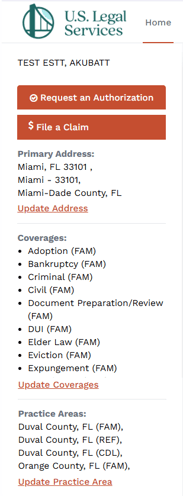
- Click the File a Claim button.

- This will take you to the claim filing area.
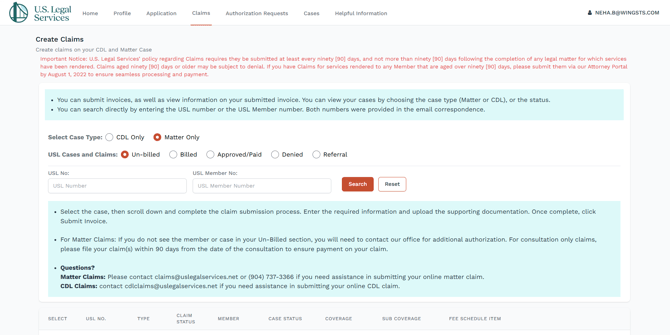
- Search for the case you want to bill in several ways.
-
Choose the case type:
-
CDL Only
-
Matter Only
-
-
You can also filter by case or claim status:
-
Un-billed
-
Billed
-
Approved/Paid
-
Denied
-
Referral
-
-
You may also search directly by entering either:
-
the USL Number, or
-
the USL Member Number
-
-
-
The cases matching the filters you have selected will appear below the instructions. You will need to to scroll down to see them.
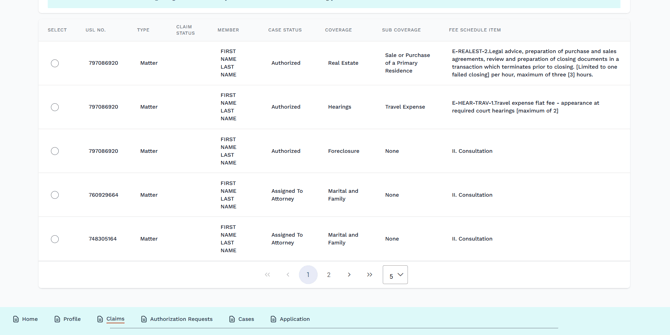
- Click the radio button next to the case you wish to file a claim for. After selecting the case, scroll down to begin the claim submission process.
- The specifics of the case will appear below the case list.
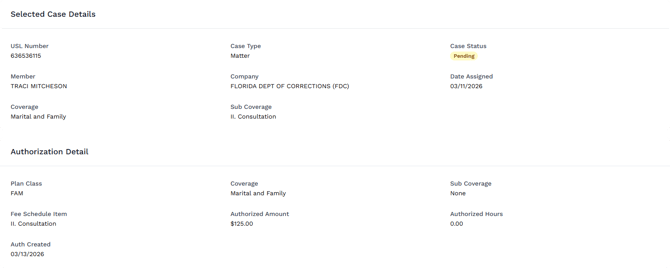
- Below the case details will be the form for filing your claim.
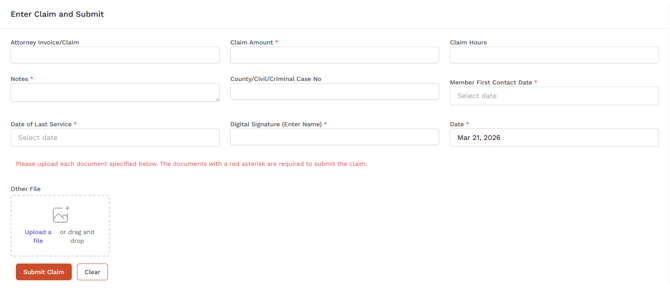
- Enter all required claim or invoice details for the selected case. Be sure all required fields are completed accurately before moving forward.
- Upload any required documents. Based on the case, a series of document upload fields will appear.

- Click Upload a File to open a file explorer window on your computer that you can use to locate and upload the file, or simply drag and drop the file onto the upload area.
- Files must be file type .pdf.
- Once you have completed filling out the form and uploading all of the required documents, click the Submit Claim button.

Additional guidance for Matter Claims
If you do not see the member or case in the Un-Billed section for a Matter claim, you will need to contact the office for additional authorization before filing the claim.
Need help?
For assistance with Matter Claims:
-
Email: claims@uslegalservices.net
-
Phone: (904) 737-3366
For assistance with CDL Claims:
-
Email: care@uslegalservices.net