
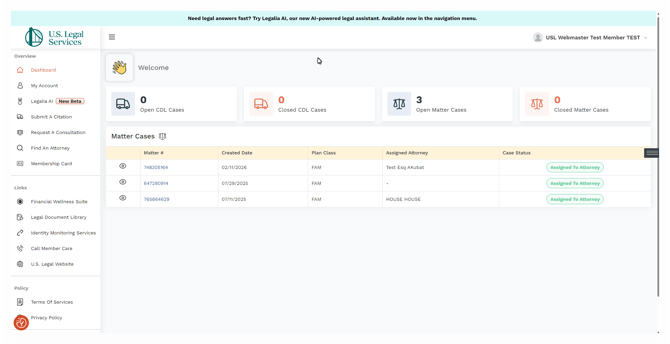
Navigating the member portal is simple using the left-hand navigation panel. Please note that the layout varies slightly between desktop and mobile devices, as shown below.
Upon initial login you will be asked where you would like to go. Simply click your choice on the Welcome back pop-up.
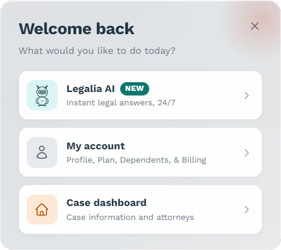
Regardless of where you choose to navigate to first, you will always have the left-side navigational panel available to you.
Desktop
Mobile
NOTE: The menu to access all of the Member Portal content on mobile will be under the "hamburger menu" to the right of the logo. Clicking it will show and hide the side navigation menu.
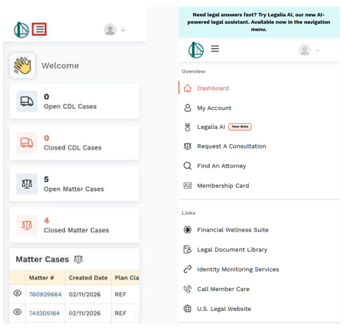
The navigation panel consists of the following choices:
Note: The available choices are conditional upon the type of coverage you have.
Overview
-
Dashboard
A place to see all of your active, closed cases with indicators for Closed, Authorized, and Assigned to an Attorney.
-
My Account
-
Member Information
Displays the basic information we have on file for you, including your coverage status and effective date.
-
Membership Status
-
Effective Date
-
Name
-
Phone
-
Email
-
Address
-
-
Plan Information
Provides a plan card for each coverage you are enrolled in. You can also download a PDF of your complete coverage details from this screen.
-
Dependents
Allows you to add dependents to your coverage and view any dependents currently enrolled under your plan.
-
Billing
-
Payment Method
If you pay by credit card, you can update your payment information here to help avoid missed payments.
-
Recent Payment Activity
Displays a list of your recent payments if you are individually enrolled and not receiving coverage through an employer or organization.
-
-
- Legalia AI(New Beta)
Legalia AI is U.S. Legal Services' AI legal assistant. It provides clear answers in everyday terms to common legal and policy questions, grounded in your state and local laws, and is available any time.Legalia AI helps you understand your options, get oriented on a legal question, and determine your next step. If legal advice is needed, it can connect you with Member Care, who will help connect you with a U.S. Legal Services Network Attorney.
-
Submit a Citation
If you are enrolled in one of our CDL Defender plans, you can submit a citation or roadside inspection directly through the member portal using the online form.
-
Request a Consultation
Submit a request online to schedule a consultation with an attorney.
-
Find an Attorney
Use our online search tool to locate an attorney near you. You may also request that we contact the attorney on your behalf to determine their availability for your case.
-
Membership Card
Access your membership card directly in the portal. You can view it online or download a PDF to print and keep with you.
- Links
-
Financial Wellness Suite
We've partnered with Best Money Moves to give you access to their award-winning financial wellness platform.
-
Legal Document Library
We've partnered with Forms Pass to give you access to their extensive library of legal forms.
-
Identity Monitoring Services
If you are enrolled in our Identity Defender Plan, you can access those resources here.
-
Call Member Care
Call Member Care directly from your computer or cell phone (If logged into the app).
-
U.S. Legal Website
Access our website directly from within the member portal.
- Policy
-
Terms Of Services
Access our Terms of service. -
Privacy Policy
Access our privacy policy.