
To register for the member portal, follow the instructions below.
-
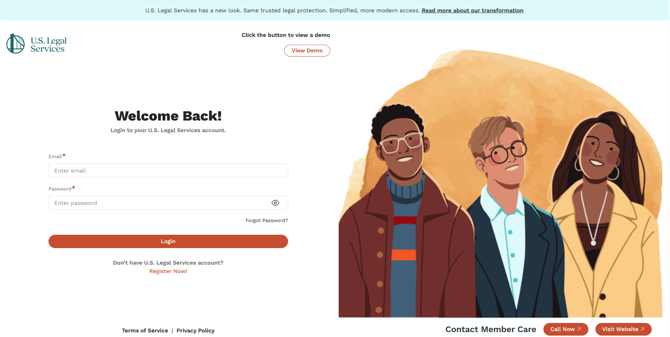
Go to https://member.uslegalservices.net/
-
Click Register Now just under the Log in Button.
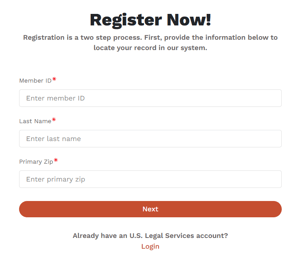
- Enter the following information:
-
Member #
-
Last Name (must match record on file with us)
-
ZIP (must match record on file with us)
-
-
Click Next.
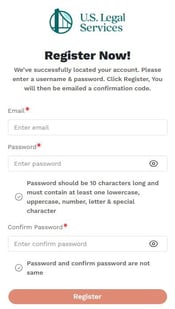
- A form will appear to set your username and password.
-
Enter your desired username and password.
-
Username must be a valid email address.
-
Password should be 10 characters long and must contain at least one lowercase, uppercase, number, letter & special character
-
- Click Register.
- A confirmation code entry page will appear. Do not navigate away from this page.
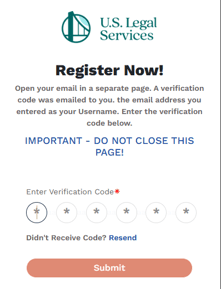
- An email is sent to the email address you entered with a confirmation code for you to confirm your account. The email should be in your inbox within 1-2 minutes. If you do not see it, check your Spam/Junk email folders.
- The email will come from U.S. Legal Services <webmaster@uslegalservices.net> and the subject line is "Your USL Member Portal Confirmation Code."
- Once you have received the email, enter the confirmation code and click Submit.
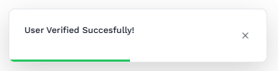
- You will be taken back to the login page, where you will see a confirmation of successful verification at the bottom of the screen.
- Once your account is confirmed, you will be able to log in with your new credentials.