-
Click Register Account in the top right of the Log In area.

-
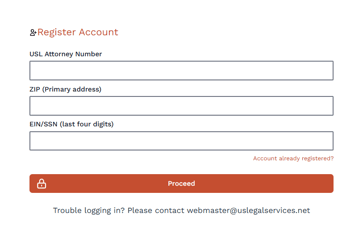
You will be given a secondary input screen.
-
Enter the following information:
-
Your USL Attorney Number
-
Your ZIP Code (if multiple locations, please use the primary address ZIP code that you originally provided on your application)
- EIN/SSN Last Four Digits (whichever is your Tax ID # that you provided on your application)
-
- Click Next.
- A form will appear to set your username and password.
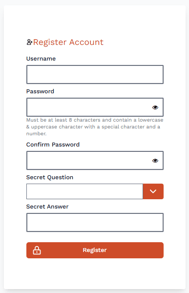
- Note: Attorney password requirements: Must be at least 8 characters and contain a lowercase & uppercase character with a special character and a number.
- Create a Username, Password, and set up a security question.
- Click Register.
- Use your newly created credentials to Login.
English - United States