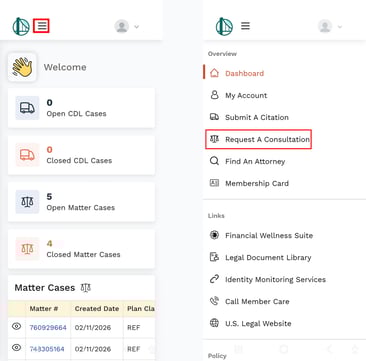
If you are a commercial driver and are covered by our CDL Defender plan, the quickest and most efficient way to submit a citation is via the member portal, either via a computer or using the mobile app.
-
Log in to the member portal.
-
Click Request a Consultation in the left-side navigation panel.
-
This will open up the submission form.
- Fill out the Request a Consultation Form.
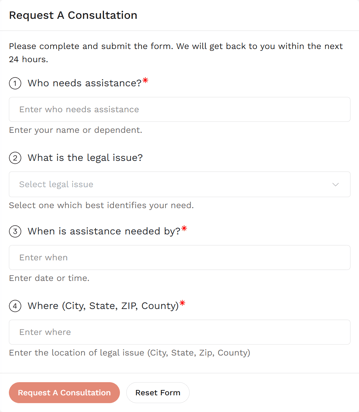
Information Needed to Complete This Form
To successfully submit your consultation request, please provide the following information:
Who Needs Assistance? (Required)
Enter the name of the person who needs legal assistance.
This may be you or an eligible dependent covered under your plan.
What Is the Legal Issue?
Select the legal issue that best describes your situation from the dropdown menu.
Choose the option that most closely matches your need to ensure proper routing and faster assistance.
When Is Assistance Needed By? (Required)
Enter the date or timeframe by which you need assistance.
If there is a deadline (such as a court date, hearing, or filing requirement), include that information.
Where Is the Legal Issue Located? (Required)
Provide the full location where the legal matter is taking place, including:
City
State
ZIP Code
County
Accurate location details help us assign your matter to an attorney licensed in the appropriate jurisdiction.
7. Once all required fields are completed, click Submit.
You will receive follow-up communication within approximately 24 hours.
If you need to start over at any time, select Reset Form.
Mobile
NOTE: The menu to access all of the Member Portal content on mobile will be under the "hamburger menu" to the right of the logo. Clicking it will show and hide the side navigation menu.