If you need to submit an authorization, you can accomplish this through the Attorney Portal.
There are two ways to access the Attorney Portal:
1. Direct Link
You may go directly to the portal using the following link: https://attorney.uslegalservices.net/login
2. Through the Website
Visit the main website at: https://uslegalservices.net/
If you are using the website, the link to get to the portals is in the top navigation bar.
-
In the top right corner of the navigation bar, click the Log In button.
-
You will be taken to the portal landing page.
-
Click the Go to Attorney Portal button.
-
You will then be redirected to the Attorney Portal.
Important filing deadline
You will be informed via email as well. Authorization Requests cannot be made on matters that are designated with a plan class of REF (Referral only). If you do not know if the matter is a REF plan class, you can refer to the Case page, which will provide you with the plan class designation on that case. This information was also provided to you via the Assigned to Attorney email that you received on the case.
- When you first log in, in the left side panel.
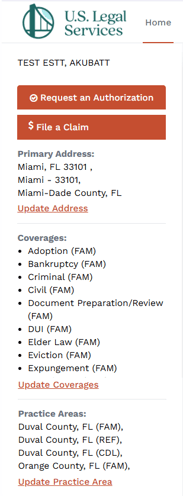
- Click the Request an Authorization button.

- This will take you to the authorization form.
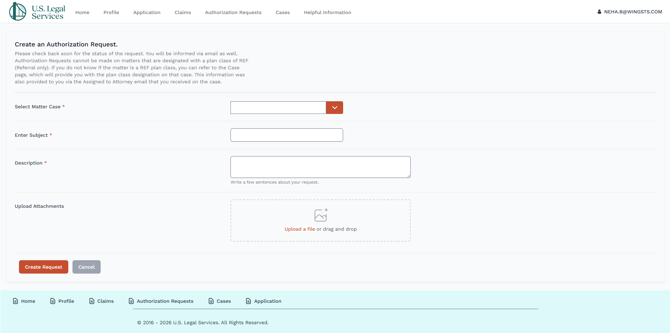
- Fill out the required information.
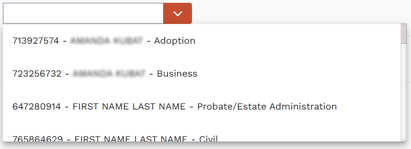
- Select Matter Case is a drop-down containing all cases assigned to you. You must select a case from the dropdown.
- Once you have completed the form, click the Create Request button.

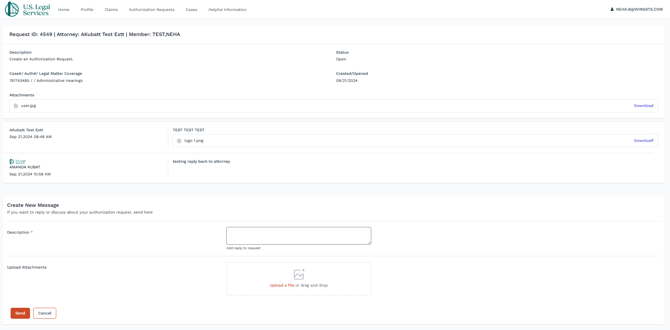
- To see the status of your previously submitted authorization requests, click on Authorization Requests in the top menu bar.

- This will take you to your Authorization Requests dashboard. You can also submit an authorization request directly from this screen using the Request an Authorization button in the top right.
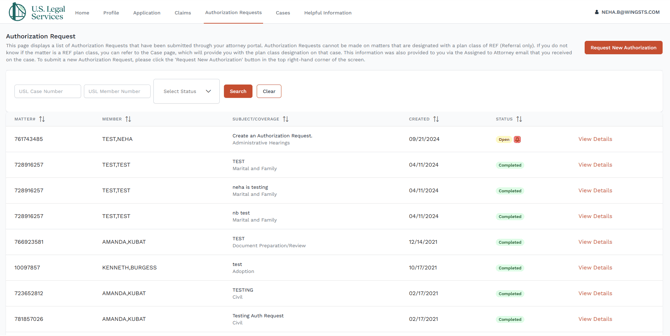
- The statuses are as follows:
 A new authorization request has been submitted.
-
 Authorization has been issued.
 There is a message requiring your attention.
- Clicking View Details to the right of any request will allow you to see the details of the authorization and allow you to send or reply to messages concerning that specific authorization request.