
If you need to update the coverages you provide or the areas in which you practice, you can accomplish this through the Attorney Portal.
There are two ways to access the Attorney Portal:
1. Direct Link
You may go directly to the portal using the following link: https://attorney.uslegalservices.net/login
2. Through the Website
Visit the main website at: https://uslegalservices.net/
If you are using the website, the link to get to the portals is in the top navigation bar.
-
In the top right corner of the navigation bar, click the Log In button.
-
You will be taken to the portal landing page.
-
Click the Go to Attorney Portal button.
-
You will then be redirected to the Attorney Portal.
Once you have logged into the attorney portal, click Profile in the top navigation bar.

In the main profile page, click Coverages & Practice Areas in the left navigation panel.
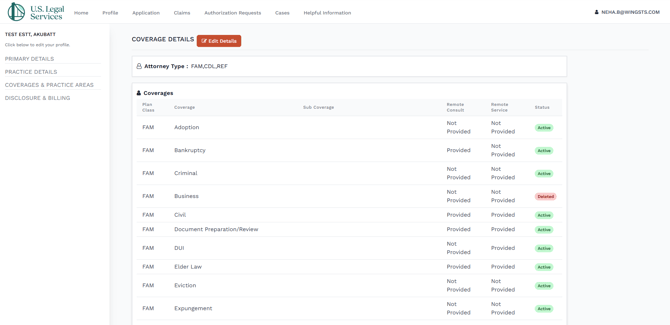
-
Click the Edit Details button.

-
A pop-up screen will show.
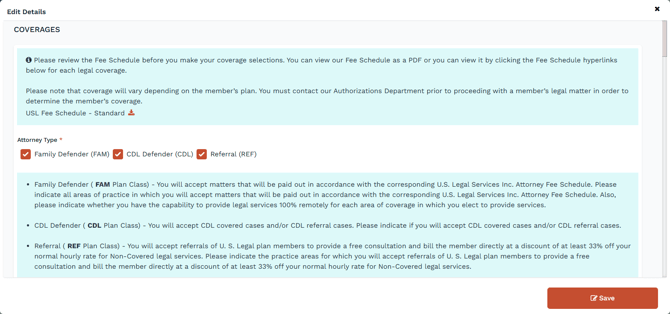
- From this screen, you can update the following profile properties.
- Attorney Type
- Family Defender (FAM)
- Family Defender ( FAM Plan Class) - You will accept matters that will be paid out in accordance with the corresponding U.S. Legal Services Inc. Attorney Fee Schedule. Please indicate all areas of practice in which you will accept matters that will be paid out in accordance with the corresponding U.S. Legal Services Inc. Attorney Fee Schedule. Also, please indicate whether you have the capability to provide legal services 100% remotely for each area of coverage in which you elect to provide services.
- CDL Defender (CDL)
- CDL Defender ( CDL Plan Class) - You will accept CDL covered cases and/or CDL referral cases. Please indicate if you will accept CDL covered cases and/or CDL referral cases.
- Referral (REF)
- Referral ( REF Plan Class) - You will accept referrals of U. S. Legal plan members to provide a free consultation and bill the member directly at a discount of at least 33% off your normal hourly rate for Non-Covered legal services. Please indicate the practice areas for which you will accept referrals of U. S. Legal plan members to provide a free consultation and bill the member directly at a discount of at least 33% off your normal hourly rate for Non-Covered legal services.
- Family Defender (FAM)
- Attorney Type
- Once you have selected the corresponding Attorney Type, you will want to scroll down and review all coverages and sub coverages, checking or toggling the appropriate ones.
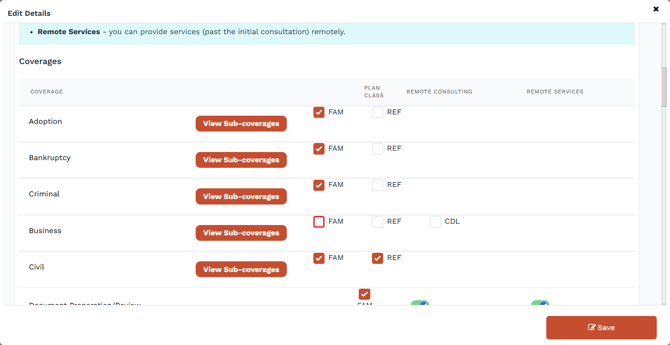
- Click View sub coverages to open the sub coverage accordion.

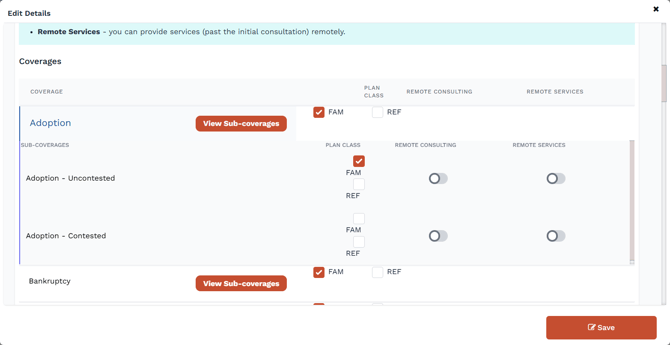
- An orange check box means that an item has been chosen.

- A Green toggle means that an item has been chosen.

- If you only need to update your practice areas, scroll to the Practice Areas section below the Coverages section.
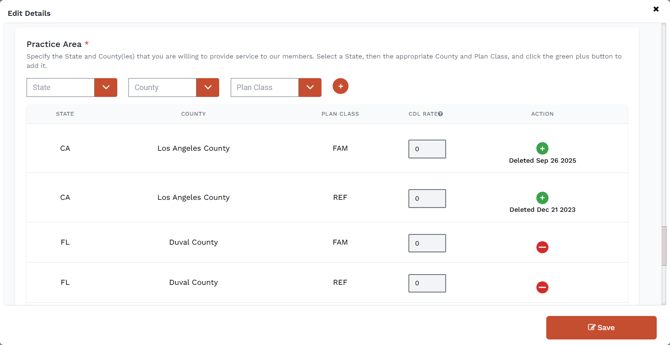
- Specify the State and County(ies) that you are willing to provide service to our members. Select a State, then the appropriate County and Plan Class, and click the green plus button to add it.
- Once a practice area has been added (new additions appear at the bottom of the list).
- Use the
 icon to delete a practice area, and the
  icon to add back a previously deleted practice area.
 - Once you have made the necessary updates, click Save.

- If you click Home in the top navigation bar.

- You will now see your coverages and practice areas listed in the left sidebar.
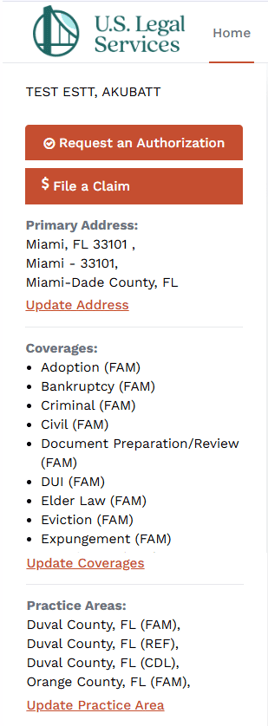
Note: You can also access the section to update your coverage and practice areas by clicking on the links under each list.

