
If you need to update your Practice Details, you can accomplish this through the Attorney Portal.
There are two ways to access the Attorney Portal:
1. Direct Link
You may go directly to the portal using the following link: https://attorney.uslegalservices.net/login
2. Through the Website
Visit the main website at: https://uslegalservices.net/
If you are using the website, the link to get to the portals is in the top navigation bar.
-
In the top right corner of the navigation bar, click the Log In button.
-
You will be taken to the portal landing page.
-
Click the Go to Attorney Portal button.
-
You will then be redirected to the Attorney Portal.
Once you have logged into the attorney portal, click Profile in the top navigation bar.

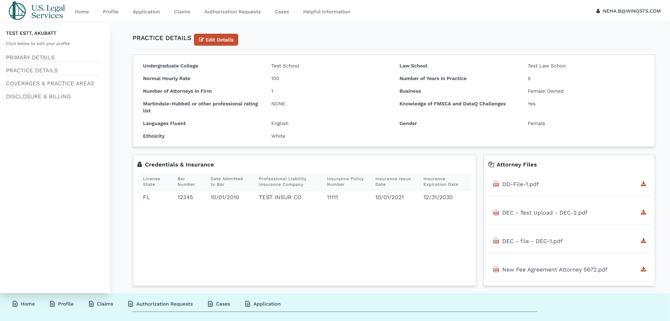
In the main profile page, click Practice Details in the left navigation panel.
-
Click the Edit Details button.

-
A pop-up screen will show.
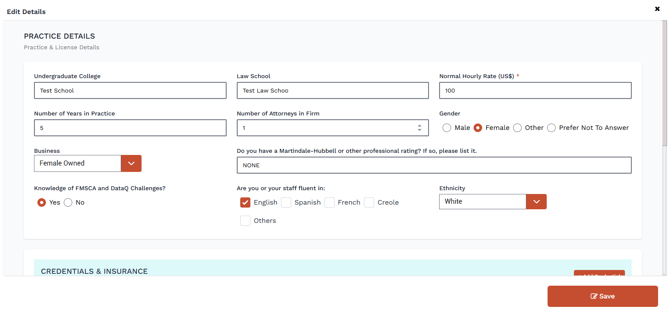
- From this screen, you can update the following profile properties.
- Practice Details
- Undergraduate College
- Law School
- Normal Hourly Rate (US$)
- Number of Years in Practice
- Number of Attorneys in Firm
- Gender
- Male
- Female
- Other
- Prefer Not To Answer
- Business
- Female Owned
- Minority Owned
- Do you have a Martindale-Hubbell or other professional rating? If so, please list it.
- Knowledge of FMSCA and DataQ Challenges?
- Yes
- No
- Are you or your staff fluent in:
- English
- Spanish
- French
- Creole
- Others
- Ethnicity
- American Indian or Alaska Native
- Asian
- Black or African American
- Hispanic or Latino
- Native Hawaiian or Other Pacific Islander
- White
- Prefer not to answer
- Credentials and Insurance
- State *
- Bar Number
- Professional Liability Insurance Company
- Insurance Policy Number
- Date Admitted to Bar
- Insurance Issue Date
- Insurance Expiration Date
- ATTORNEY FILES
- Please attach a copy of the declaration page from your professional liability policy and a copy of your W-9 Form.
From this screen, you can update the following profile properties.
- Please attach a copy of the declaration page from your professional liability policy and a copy of your W-9 Form.
- Practice Details
- Once you have made the necessary updates, click Save.