
If you need to update your profile, you can accomplish this through the Attorney Portal.
There are two ways to access the Attorney Portal:
1. Direct Link
You may go directly to the portal using the following link: https://attorney.uslegalservices.net/login
2. Through the Website
Visit the main website at: https://uslegalservices.net/
If you are using the website, the link to get to the portals is in the top navigation bar.
-
In the top right corner of the navigation bar, click the Log In button.
-
You will be taken to the portal landing page.
-
Click the Go to Attorney Portal button.
-
You will then be redirected to the Attorney Portal.
Once you have logged into the attorney portal, click Profile in the top navigation bar.

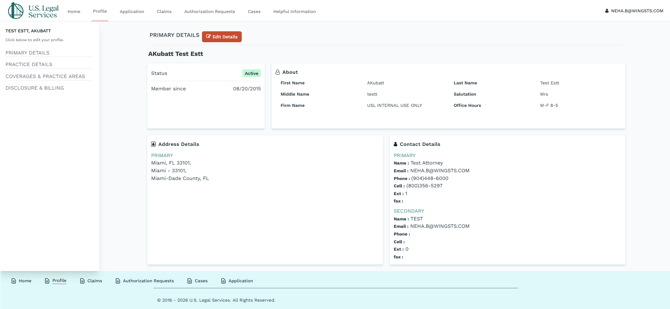
In the main profile page, click Primary Details in the left navigation panel.
-
Click the Edit Details button.

-
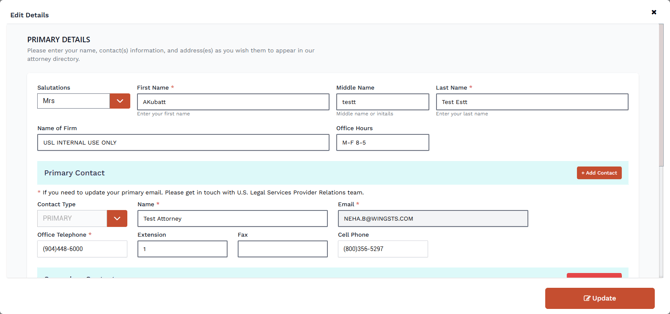
A pop-up screen will show.
-
From this screen, you can update the following profile properties.
-
Primary Details
-
Salutation
-
First Name
-
Middle Name
-
L:ast Name
-
Name of Firm
-
Office Hours
-
-
Primary Contact (Use the Add contact button to add additional secondary contacts.
-
Name
-
Email
-
If you need to update your primary email. Please get in touch with the U.S. Legal Services Attorney Relations team at attorneyinfo@uslegalservices.net.
-
-
Office Telephone
-
Extension
-
Fax
-
Cell Phone
-
-
Secondary Contact (Use the Remove Contact button to remove any secondary contacts.
-
Name
-
Email
-
Office Telephone
-
Extension
-
Fax
-
Cell Phone
-
-
Primary Address
-
Address 1
-
Address 2
-
City
-
State
-
Country
-
Zip
-
-
- Once you have made the necessary updates, click Save.